Executive Summary:
The support team was spending a lot of time handling routine customer cases—like
payment requests, remittance confirmations, and document submissions. These tasks
followed predictable steps but were still being done manually, one by one.To fix this, we
built the AgentForce Smart Case Manager, which uses AI to automatically analyze
new cases, suggest the best next action, and allow the support team to quickly approve
or override the AI suggestion. Once approved, AgentForce executes the task
automatically—saving hours of manual work and speeding up response times.
Business Challenge:
The Problem (Before AgentForce):
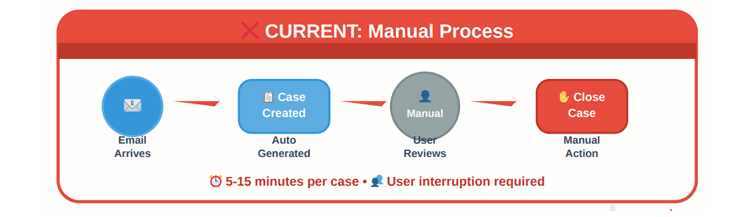
- High volume of repetitive cases: Most support cases followed the same
steps—like sending forms or confirming remittance—but had to be manually
reviewed. - Manual triage: Every case was read, interpreted, and handled by a support
agent—even when no human decision was really needed. - Time wasted: This consumed most of the team’s working hours, delaying
responses to more complex or urgent cases.
- Inconsistent actions: Different team members could take different steps for the
same kind of request.
The Need:
The team needed a way to automate the handling of predictable cases while still
allowing human control for exceptions.
Solution
AI-Powered Case Handling: A Confident Step Toward Full Automation
We’ve transformed case handling from manual to semi-automated—and are on the path
to full automation—using Salesforce tools and AgentForce.
1. Automatic Case Creation
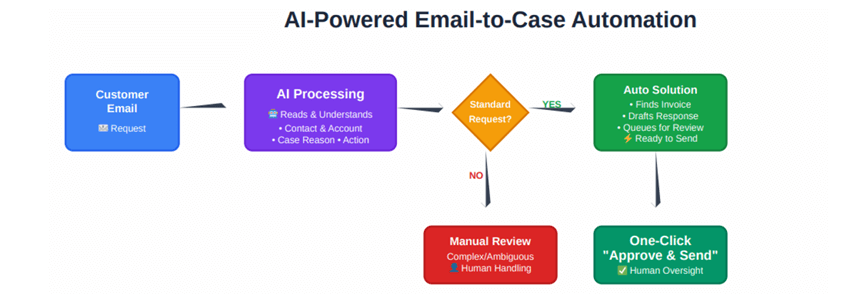
Customer emails are automatically converted into Salesforce cases via Email-to-Case—completely eliminating manual entry.
2. AI-Powered Case Analysis
AgentForce reviews each case’s subject and description to:
- Identify the type of request (e.g., credit card form, remittance advice)
- Recommend the next best action
- Provide a brief AI-generated explanation (AI Reasoning)
- Set the case status to Under Support Team Review
3. One-Step Approval for User Confidence
To ensure users trust AI-driven actions, we’ve introduced a simple, one-step approval process:
- All pending cases appear in the Support Team Review view.
- Agents can either:
– Approve the AI recommendation – AgentForce executes it automatically
– Opt for manual handling – The agent takes over and logs feedback to improve future AI decisions
This approach allows us to gradually transition to full automation based on real user input, with confidence and transparency.
4. Automation Upon Approval
When a case is marked Approved – AI to Proceed, AgentForce takes full action:
- Sends forms or replies to customers
- Forwards emails to the correct department
- Closes the case automatically when done
AgentForce’s Expanding Autonomous Capabilities:
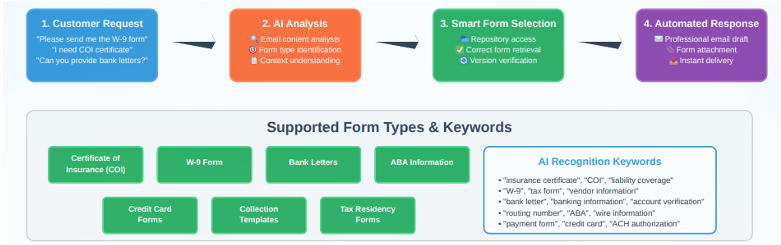
- Sending Credit Card Authorization Forms
- Sending W9, COI, Tax Residency, and ABA Information
- Routing Remittance Notifications
- Identifying and closing “No Action Required” cases
- Forwarding Credit Card Payment requests to the Finance team
Results / Impact:
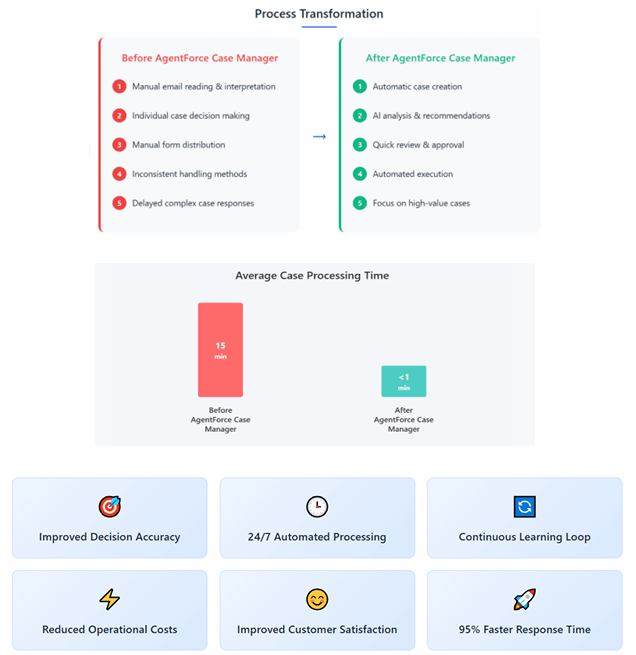
Since the deployment of AgentForce Smart Case Manager, the support team has seen significant improvements in efficiency and response time. Key outcomes include: