
-
Purpose and Business Requirement
This document explains how the Special Needs Status identified during the opportunity process is carried forward to the Job record and subsequently used by dispatchers to identify and filter jobs on the Dispatcher Board.
Business intent: As stated by IMG, the special-needs information associated with an opportunity should remain visible when the related Job is created. This allows the dispatch team to recognize jobs that require special attention and quickly isolate them using dedicated Dispatcher Board filters.
-
End-to-End Process
| Process Stage | System Behavior |
| Opportunity | The opportunity contains the applicable Special Needs Status based on the business process. |
| Job Creation | When the opportunity progresses to the stage that creates the Job, the Special Needs Status is carried into the Job. |
| Job Record | The Job displays the Special Needs Status and a calculated Special Needs Detail field where applicable. |
| Dispatcher Board | The Job’s Special Needs Status is available for dispatcher filtering. |
| Dispatcher Action | Dispatchers can select the appropriate Special Needs filter to focus on jobs requiring attention. |
-
Special Needs Status on the Job
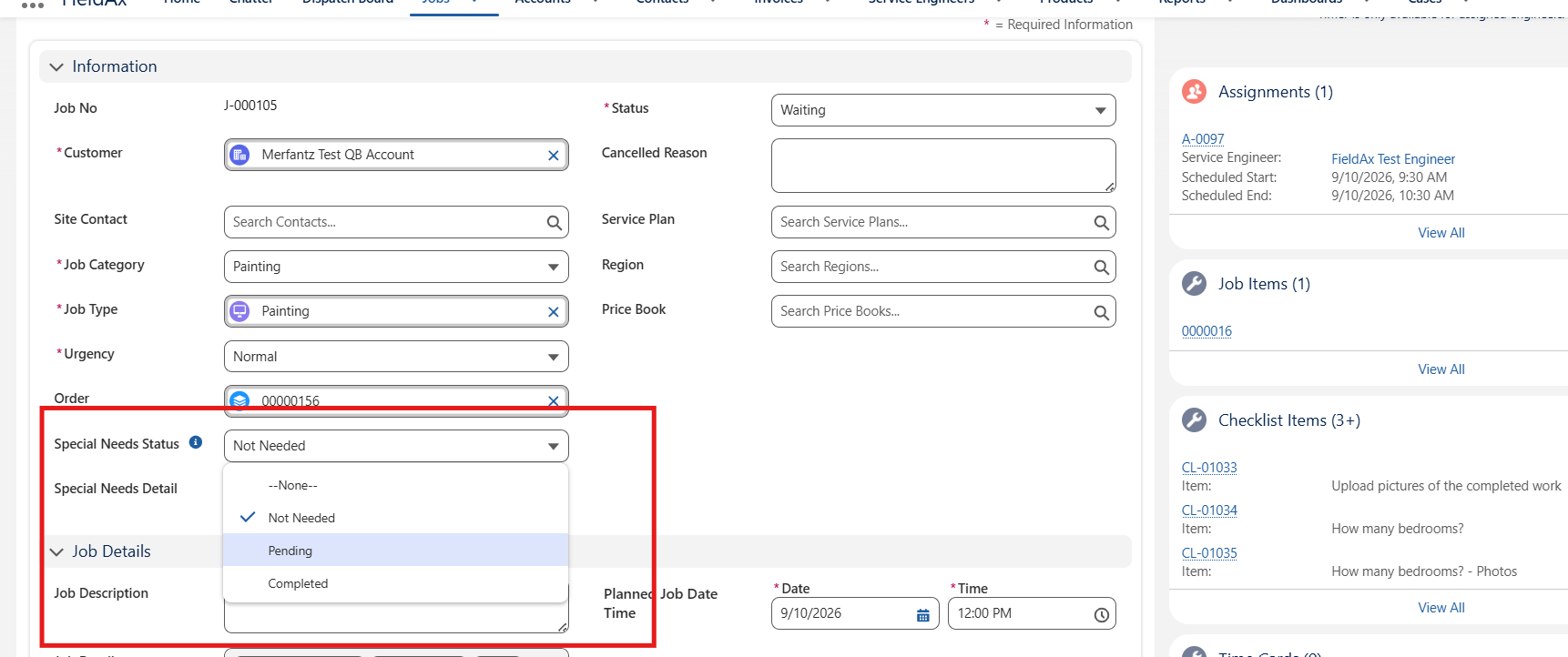
The Job record contains a dedicated Special Needs Status field. The available status values shown in the current configuration are:
| Status | Meaning |
| Not Needed | No special-needs action is currently required for the job. |
| Pending | Special-needs requirements are still outstanding and require follow-up or completion. |
| Completed | The identified special-needs requirement has been addressed/completed. |
Important: The Job-level Special Needs Status is intended to reflect the status originating from the opportunity process. This provides continuity of information from sales/operations through job dispatch.
-
Job Record – Special Needs Information
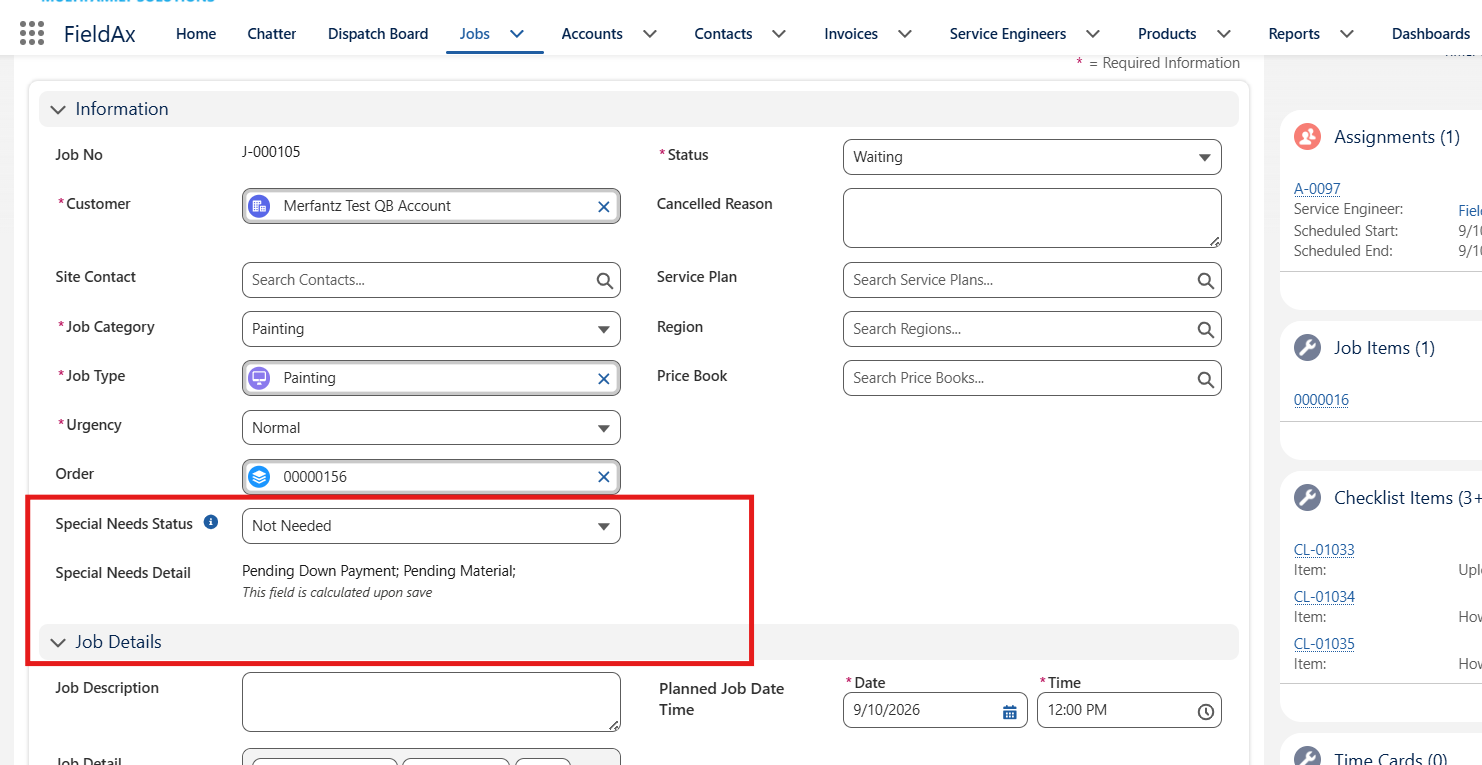
The Job screen provides the dispatcher/operations user with the Special Needs Status directly within the Information section. In the example below, the Job shows the status as ‘Not Needed’.
Figure 1. Special Needs Status displayed on the Job record.
Special Needs Detail: The Job also displays Special Needs Detail beneath the status. This field is calculated upon save and provides additional context when there are outstanding special-needs items. For example, the system may display details such as pending payment or pending material.
-
Calculated Special Needs Detail
Where applicable, the Special Needs Detail field summarizes the underlying special-needs conditions associated with the Job. This gives the user more context than the status alone.
Figure 2. Example of calculated Special Needs Detail on the Job.
-
Dispatcher Board – Special Needs Filters
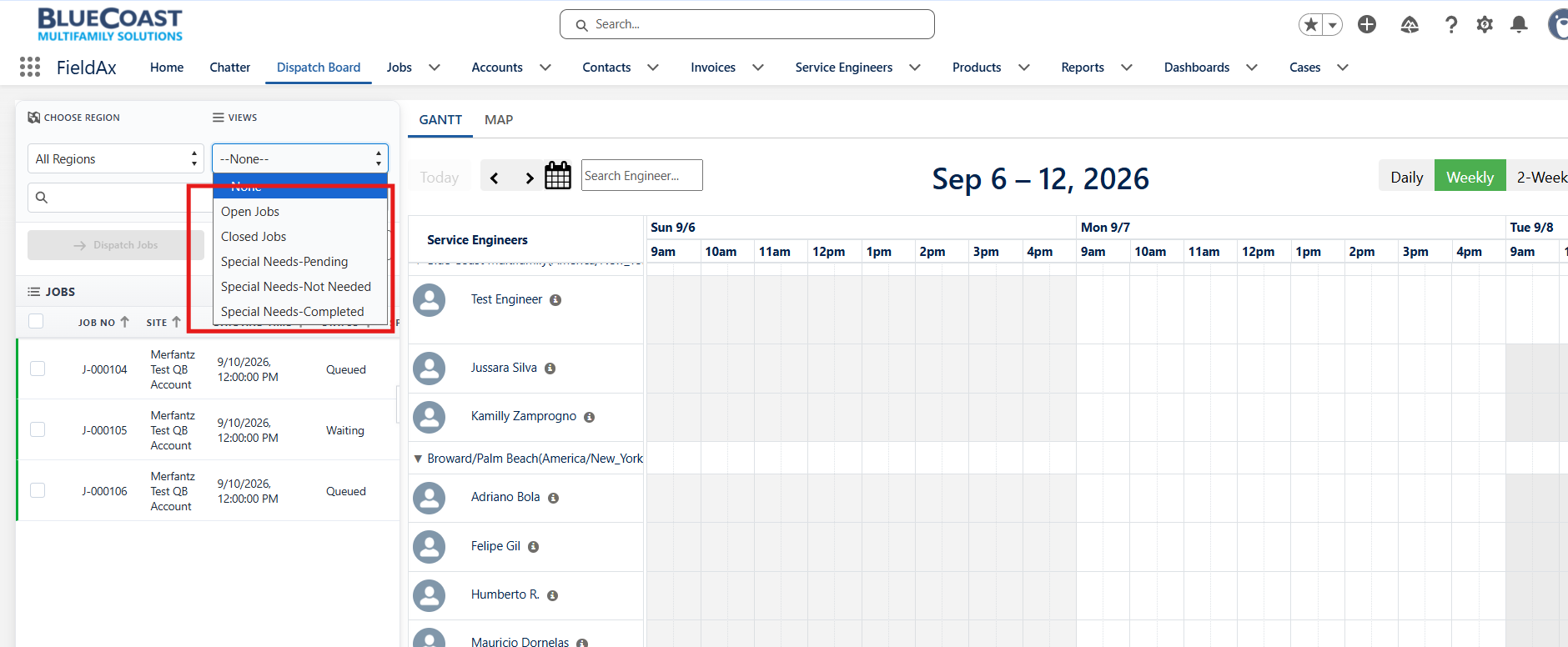
To make the Special Needs information actionable for dispatch operations, the Dispatcher Board has been configured with dedicated views/filters. These filters allow dispatchers to narrow the job list based on the Special Needs Status.
Configured filter views:
| Dispatcher Board Filter | Jobs Included |
| Special Needs-Pending | Displays jobs where the Special Needs Status is Pending. |
| Special Needs-Not Needed | Displays jobs where the Special Needs Status is Not Needed. |
| Special Needs-Completed | Displays jobs where the Special Needs Status is Completed. |
- Using the Filters
- Open the Dispatcher Board and locate the Views filter on the left-hand side.
- Select the required Special Needs view from the dropdown.
- The Dispatcher Board refreshes to show the jobs matching the selected Special Needs Status.
- Review the filtered jobs and proceed with the normal dispatching process, including assigning the appropriate Service Engineer and scheduling the work.
Figure 3. Dispatcher Board showing the Special Needs filter options.
-
Operational Behavior for Dispatchers
- The dispatcher can continue to use the standard job list and Dispatcher Board without using a Special Needs filter.
- When the dispatcher needs to focus on a particular Special Needs category, the corresponding filter can be selected.
- The filtering is driven by the Special Needs Status stored on the Job.
- Because the Job receives the relevant status from the opportunity process, the dispatcher does not need to manually recreate the original special-needs classification.
- The Special Needs Detail provides additional context for jobs where outstanding requirements exist.
- Example Scenario
Example: An opportunity is identified with special-needs requirements that remain outstanding. When the Job is created, the applicable Special Needs Status is carried to the Job as ‘Pending’. The dispatcher can then select ‘Special Needs-Pending’ on the Dispatcher Board to immediately identify the relevant jobs. The dispatcher can review the Job and its Special Needs Detail before proceeding with dispatch.
-
Business Benefits
- Maintains continuity of Special Needs information from Opportunity to Job.
- Makes special-needs information visible to the operations and dispatch teams.
- Provides a focused way to identify jobs requiring special attention.
- Reduces manual effort in identifying and grouping jobs.
- Supports consistent dispatch handling based on the status of special-needs requirements.
- Provides additional detail where outstanding requirements exist.
-
Summary
The configured solution connects the Special Needs information from the opportunity process to the Job and then exposes that information through the Dispatcher Board. The three dedicated views — Special Needs-Pending, Special Needs-Not Needed, and Special Needs-Completed — give dispatchers a simple mechanism to organize and work with jobs according to their Special Needs Status. This ensures that the information provided during the opportunity stage remains available at the point where dispatch and operational decisions are made.