
- Purpose
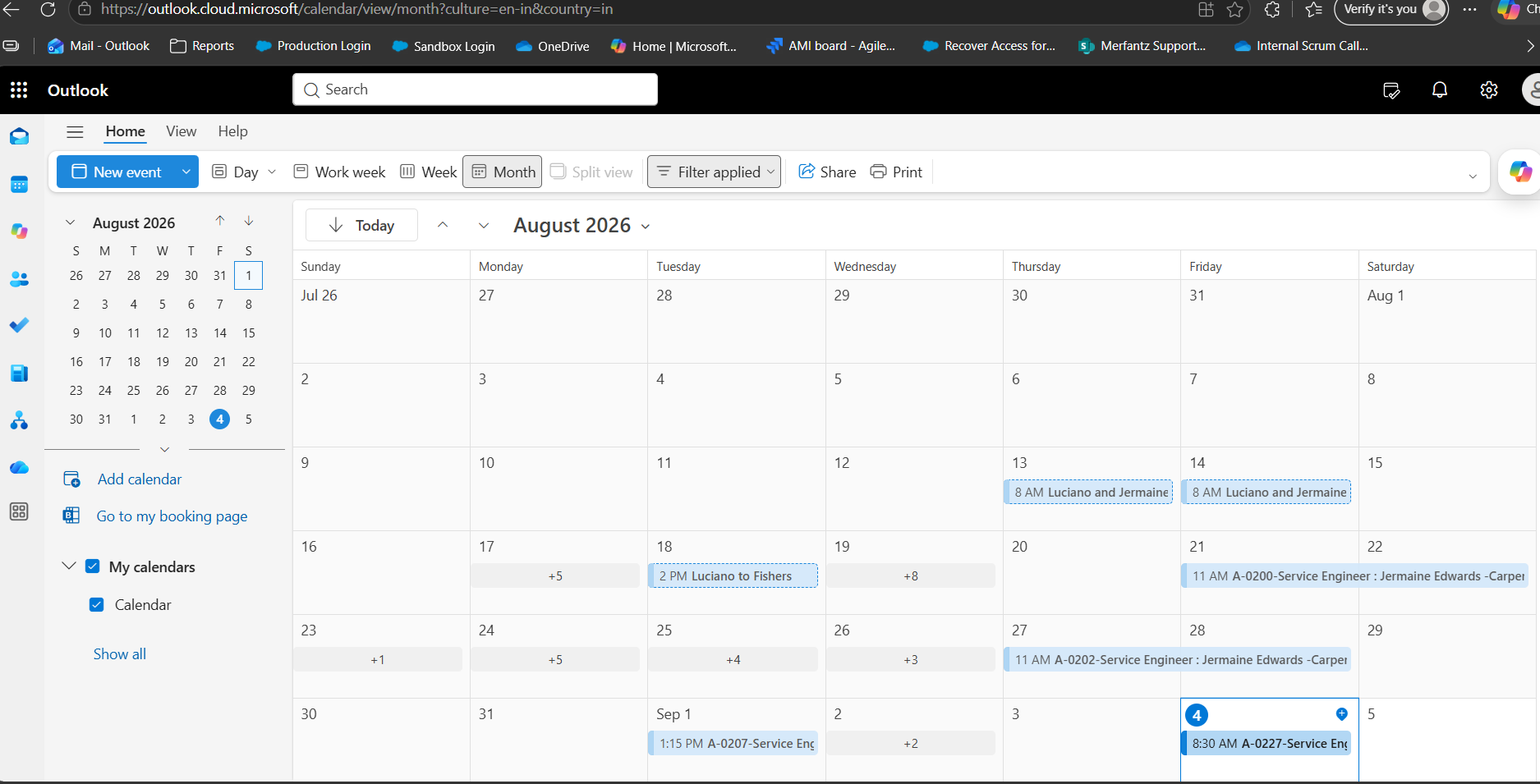
This document explains how a Service created in FieldAx is reflected as a reminder/calendar event in Microsoft Outlook for the assigned Service Engineer.
The integration ensures that when a Service is created, updated, or deleted in FieldAx, the corresponding Outlook calendar reminder is created, updated, or deleted accordingly.
- Process Overview
The overall process is:
Service Created in FieldAx → Outlook Reminder Created
Service Updated in FieldAx → Outlook Reminder Updated
Service Deleted in FieldAx → Outlook Reminder Deleted
This ensures that the Service Engineer’s Outlook calendar remains synchronized with the latest Service information in FieldAx.
- Service Creation in FieldAx
A Service is created in FieldAx based on the service requirement. Scheduling information is available, an Outlook calendar event/reminder is created for the assigned Service Engineer.
- Outlook Reminder Creation
When a Service meets the configured criteria, the FieldAx integration creates a corresponding calendar event in Outlook.
The Outlook event is created using the relevant Service information available in FieldAx.
Based on the above information, an Outlook calendar event is created for the assigned Service Engineer.
- Outlook Calendar Reminder
The Outlook calendar event contains the relevant Service information required by the Service Engineer.
Example Outlook Entry
Subject:
Service – SW-00125 – ABC Industries
Date:
10 September 2026
Time:
10:00 AM – 12:00 PM
Location:
Customer Service Location
An Outlook reminder notification can also be configured for the calendar event based on the agreed reminder duration.
For example:
Scheduled Time: 10:00 AM
Outlook Reminder: 15 minutes before the scheduled time
- Service Update
If an existing Service is updated in FieldAx, the corresponding Outlook calendar event is also updated to reflect the latest Service information.
Example
Original Service Schedule
10 September 2026
10:00 AM – 12:00 PM
Updated Service Schedule
11 September 2026
2:00 PM – 4:00 PM
The corresponding Outlook calendar event is updated with the new date and time.
This ensures that the Service Engineer’s Outlook calendar always reflects the latest Service schedule.
- Service Deletion
If a Service is deleted in FieldAx after the corresponding Outlook calendar event has been created, the related Outlook calendar event is also deleted.
This prevents the Service Engineer from receiving a reminder for a Service that has been deleted.
Process
Service Deleted in FieldAx
↓
Corresponding Outlook Calendar Event Identified
↓
Outlook Calendar Event Deleted
- End-to-End Process
- Service Creation
Service Created in FieldAx
↓
Service Engineer Assigned
↓
Service Date & Time Available
↓
Outlook Calendar Event Created
↓
Outlook Reminder Available to Service Engineer
- Service Update
Service Updated in FieldAx
↓
Updated Service Information Identified
↓
Corresponding Outlook Calendar Event Updated
↓
Service Engineer Sees the Updated Information
- Service Deletion
Service Deleted in FieldAx
↓
Corresponding Outlook Calendar Event Identified
↓
Outlook Calendar Event Deleted
- Synchronization Summary
| FieldAx Action | Outlook Action |
| Service Created | Create Outlook calendar event/reminder |
| Service Date Updated | Update Outlook calendar event |
| Service Time Updated | Update Outlook calendar event |
| Service Engineer Updated | Update/reassign Outlook calendar event |
| Service Details Updated | Update corresponding Outlook calendar details |
| Service Location Updated | Update Outlook calendar event |
| Service Deleted | Delete corresponding Outlook calendar event |
- Key Dependencies
The Outlook reminder process depends on the following:
- A Service must be created in FieldAx.
- The required Service Engineer information must be available.
- The Service must have valid scheduling information.
- The FieldAx-to-Outlook integration must be active.
- The assigned Service Engineer must have the required Microsoft/Outlook configuration.
- The Service must meet the configured criteria for Outlook synchronization.
- Expected Outcome
The purpose of the integration is to maintain synchronization between FieldAx and Outlook throughout the lifecycle of the Service.
| Service Lifecycle | Expected Outlook Result |
| Create | Outlook reminder is created |
| Update | Existing Outlook reminder is updated |
| Delete | Existing Outlook reminder is deleted |
Therefore, any relevant change made to the Service in FieldAx is reflected in Outlook, ensuring that the Service Engineer has the latest scheduling information and does not receive reminders for Services that have been deleted.