
Site link: https://soundres.my.salesforce-sites.com/
Owner Self-Service Web Portal — Current Sandbox Configuration Review
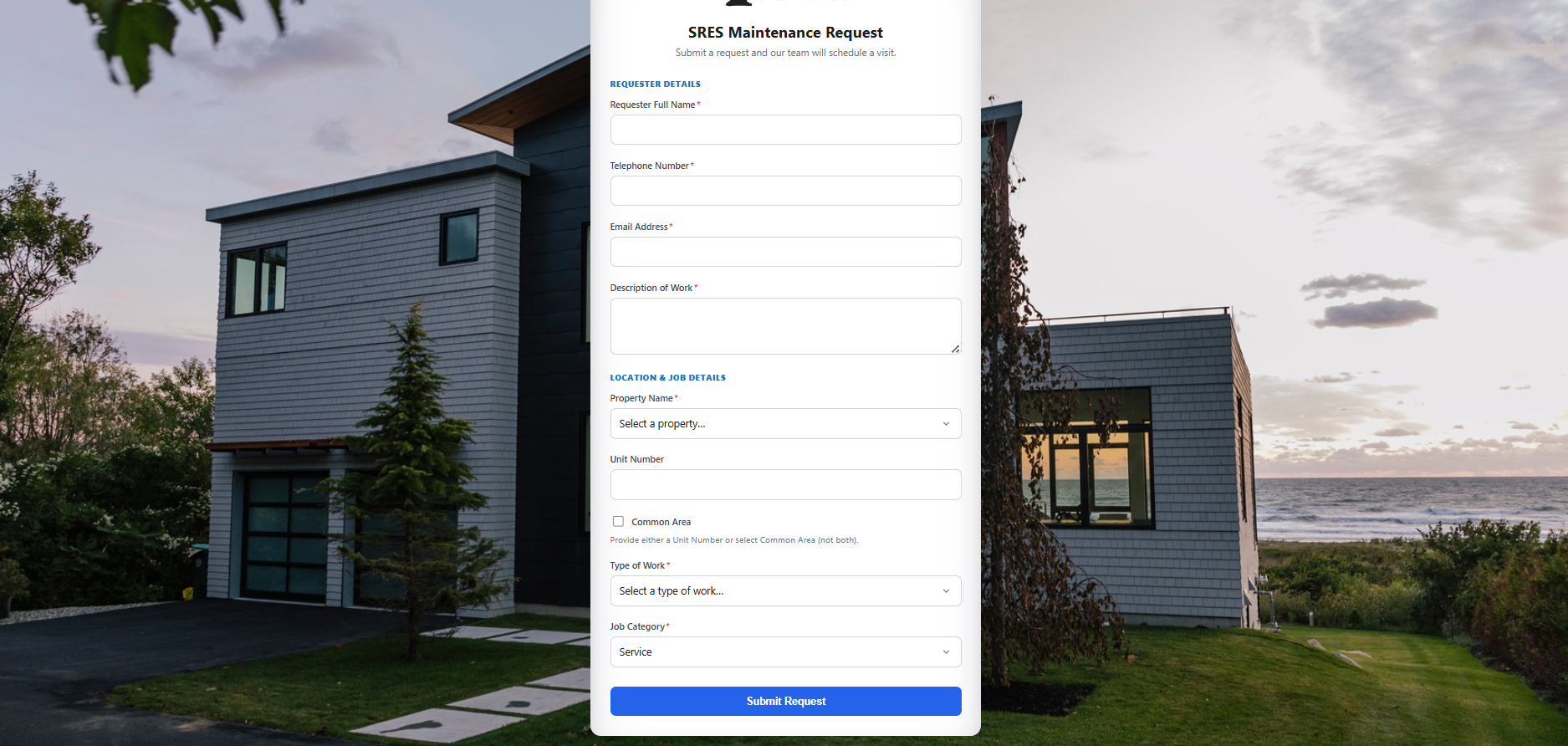
1. What This Document Covers
This document records the fields and logic currently configured on the live “SRES Maintenance Request” web form (the owner self-service portal), based on a direct review of the form. It’s organized by form section, and flags a few places where the current build differs from the acceptance criteria in the documented user story, so these can be confirmed with Josh or corrected before UAT.
2. Form Structure Overview
The form has three sections, in this order:
- Requester Details — who is submitting the request
- Description of Work — free-text explanation of the issue
- Location & Job Details — property, unit/common area, type of work, and job category
3. Section: Requester Details
| Field | Type | Required? | Notes / Logic |
| Requester Full Name | Text | Yes | Captures the submitter’s name. |
| Telephone Number | Phone | Yes | No format mask observed on the form as rendered. |
| Email Address | Yes | Used to send the confirmation email. |
4. Section: Description of Work
| Field | Type | Required? | Notes / Logic |
| Description of Work | Text area | Yes | Primary free-text field for describing the issue. |
5. Section: Location & Job Details
5.1 Property Name
Searchable dropdown, required. Currently pre-loaded with the 32 SRES association clients plus 5 Salesforce sample/demo accounts left over from the base org (Test 5, Acme (Sample), Global Media (Sample), salesforce.com (Sample), Test Account):
You can select property name and specify either one of it Unit area or Common area.
| • 101 Main Unit Owners Assoc. | • 123 Elm Street Association, Inc. |
| • 138 Post Condominium Association, Inc. | • 60 Willow Street Unit Owners Assoc., Inc. |
| • Bishops Cove Assoc., Inc. | • Candlewood Ridge Condo. Assoc., Inc. |
| • Crystal Lake Condo. Assoc., Inc. | • Essex Glen Association, Inc. |
| • Ethan’s Landing Association, Inc. | • Hammock Point Association, Inc. |
| • Longview Village Condo. Assoc., Inc. | • Lyme Regis Association, Inc. |
| • Mystic Point Assoc., Inc. | • New Concord Green Condo. Assoc., Inc. |
| • Niles Hill Common Condo. Assoc., Inc. | • Ocean Park Condominium, Inc. |
| • Piano Works Condo. Assoc., Inc. | • Quanaduck Cove Condominium Assoc., Inc. |
| • Randall’s Wharf Assoc., Inc. | • Riversedge Association, Inc. |
| • Sheltered Cove Condo. Assoc., Inc. | • Spinnaker Association, Inc. |
| • Spyglass Hill Townhomes Condo. Assoc., Inc. | • Stoneheighes Estates |
| • Stonington Acres Association, Inc. | • Thames Landing Condo. Assoc., Inc. |
| • The Borough School, Inc. | • The Broadway School Unit Owners Assoc. |
| • The Norton Unit Owners Assoc., Inc. | • The Standard Unit Oowners Association, Inc. |
| • Villages Centre Residences Owners Assoc., Inc. | • Westchester Hills Condo. Assoc., Inc. |
5.2 Unit Number / Common Area
| Field | Type | Required? | Notes / Logic |
| Unit Number | Free text | Conditional | Not a dropdown, per Josh’s requirement (units aren’t sequential, e.g. 1101, B4). |
| Common Area | Checkbox | Conditional | Alternative to a unit number, e.g. dumpster cleaning, parking lot. |
Helper text shown on the form: “Provide either a Unit Number or select Common Area (not both).” This matches the mutually-exclusive / “either one required” rule in the acceptance criteria.
5.3 Type of Work
Required picklist. This field is new relative to the documented user story — the original spec only called for a free-text “Description of Work” field. The current build adds a structured category on top of that:
| • Carpentry – General | • Carpentry – Skilled |
| • Deck/Patio | • Door/Lock |
| • Drainage | • Drainage – Exterior |
| • Drain – Interior | • Dryer Vent |
| • Drywall | • Dumpster/Dump Run |
| • Electrical – General | • Electrical – Lighting |
| • Electrical – Skilled | • Fencing |
| • Gutter – Repair | • Gutter – Cleaning |
| • Handrail | • Janitorial |
| • Landscaping | • Leak |
| • Light Timers | • Painting |
| • Pool – Inspection | • Pool – Other |
| • Power Washing | • Preventative/Recurring |
| • Roof – Flashing | • Roof – Leak |
| • Roof – Other | • Screens |
| • Siding | • Signs |
| • Smoke Detector | • Window |
| • Window Well |
5.4 Job Category
| Field | Type | Required? | Notes / Logic |
| Job Category | picklist (fixed) | Yes | Currently shown fixed to “Service.” Purpose and other possible values not yet confirmed. |
- Individual Owner — flags the work as being for a specific unit owner, not the association.
- Need to Schedule with Owner — when checked, should reveal required Owner Phone and/or Owner Email fields.
- Bill to Owner — checkbox controlling whether the job bills to the owner (checked) or the association (default/unchecked).
7. Behavior After Submission (Per Documented Spec)
Not verifiable directly from the form UI, but per the user story these should be true once a request is submitted:
- A Jobecord is created automatically in FieldAx — no manual re-entry.
- The Job is linked to the correct association account based on the selected Property Name.
- The new Job appears on the FieldAx dispatch board in “Queued” status immediately.
- A confirmation email is sent to the requester (summary: property, unit/common area, description).
- A copy of the notification is sent to the SRES internal office inbox.